Introducing Suspenders, the thoughtbot Rails template.
Install
To create a new project, checkout the github repository and run:
./script/create_project projectname
This will create a project in ../projectname. You should then follow the instructions on GitHub to upload that project there. This script creates an entirely new Git repository, and is not meant to be used against an existing repo.
Changes to the template can be easily pulled it into your project via:
rake git:pull:suspenders
This is funny, because you’re pulling your suspenders.
About
Suspenders was created for use at thoughtbot as a baseline application setup, with reasonable default plugins that the majority (if not all) of our applications used, as well as best-practice configuration options.
Thanks to various Boston.rb people and rails rumble people for attempting to use suspenders this past weekend and giving it it’s first non-thoughtbot-internal usage.
Suspenders currently includes Rails 2.1.1
vendor/gems
will_paginate
RedCloth
mocha
factory_bot
thoughtbot-shoulda
quietbacktrace
vendor/plugins
hoptoad_notifier
limerick_rake
mile_marker
squirrel
helper_test
config/initializers
time_formats.rb(Two time formats are available by default,:short_dateand:long_date)action_mailer_configs.rb(We use SMTP by default in all applications)hoptoad.rb(Get your API key at http://hoptoadapp.com)requires.rb(automatically requires everything in:)lib/lib/extensionstest/mocks/RAILS_ENV(Removed in Rails 2, we decided to keep it)
Rake Tasks
Rake tasks are contained in the limerick_rake gem.
- bootstrap (Provides rake tasks for loading data into the database. These are used for an initial application dataset needed for production.)
- capistrano (Standard capistrano deployment tasks)
Testing
The basic test setup uses Test::Unit, Shoulda, factory_bot, and mocha,
and includes some standard shoulda macros that we’ve used on various projects.
Factory Bot1 is a fixture replacement library, following the factory pattern. Place your factories in test/factories.rb. The fixture directory has been removed, as fixtures are not used.
Shoulda is a pragmatic testing
framework for TDD and BDD built on top of Test::Unit. A
number of additional testing macros are provided in test/shoulda_macros:
Deployment
Deployment is done using capistrano, and deploys to a mongrel cluster, running under Apache.
Rake tasks are provided for managing Git branches which the different environments pull from for deploy.
To push the Git master to Git staging branch run:
rake git:push:staging
To push the Git staging branch to production branch run:
rake git:push:production
Setup your deployment environment by running:
cap ENVIRONMENT deploy:setup
You’ll be prompted for the environment’s database password
Deploy to the desired environment by running:
cap ENVIRONMENT deploy
The default environment for deploy is staging, to deploy to staging, just run:
cap deploy
Mascot
The official Suspenders mascot is Suspenders Boy.
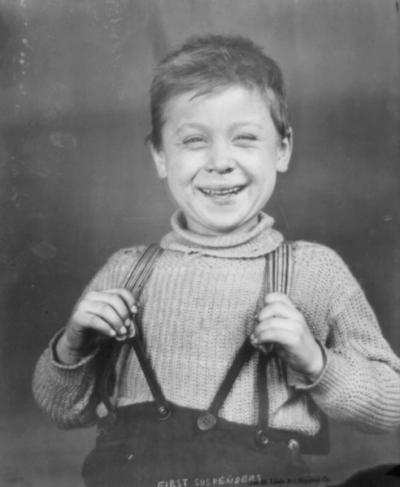
Project name history can be found here.
-
Looking for FactoryGirl? The library was renamed in 2017. ↩